Yes. In compliance with PAGCOR regulations, you must be 21 years or older to register and participate.
1. Click here to download the Android APK file.
2. Once downloaded, a pop-up will prompt for settings.
3. Enable “Allow from this source” on the redirected page.
4. Turn it on to update the Laki Play app.
5. Installation will begin automatically; you can play once it is complete.
If you still need help, click here to contact our customer service.
Use your mobile number to register for Laki Play. You will receive an OTP to verify your number and activate the account.
If you still need help, click here to contact our customer service.
Yes, you can use your registered mobile number to log in to Laki Play.
• Tap “Resend” to request a new OTP.
• Make sure your internet connection is stable.
• Check that you entered the correct mobile number.
If you still need help, click here to contact our customer service.
Users are not allowed to change their registered mobile number directly. All submitted personal information must remain consistent with the information used during registration.
If you need to update your personal information for a valid reason, contact customer support and provide a detailed explanation.
If you suspect that your account has been hacked or compromised, contact customer support immediately for further assistance.
In compliance with PAGCOR regulations, each user is allowed to have only one Laki Play account. All accounts must complete the KYC (Know Your Customer) process to ensure that platform activities are safe, secure, and compliant with Philippine laws.
Creating or using multiple accounts is strictly prohibited. If Laki Play detects a violation, the relevant account or accounts may be suspended, permanently blocked, or blacklisted, depending on the severity of the case.
In serious cases, the user may also be subject to penalties under applicable laws and regulations.
Yes, Laki Play has a Tagalog version.
To change the language:
• Go to the “Me” page in your account.
• Scroll down and select “Language.”
• Select your preferred language.
Laki Play is currently available only to users located in the Philippines, in accordance with PAGCOR regulations.
If the platform displays an error message or a blank screen, it could be caused by one of the following:
• Unstable internet connection
• Outdated app version or browser
• System maintenance or updates in progress
• Cache or data loading issues
Try the following steps:
• Refresh the page or restart the app
• Check your internet connection
• Clear your browser/app cache
• Update to the latest version of the app or browser
If the problem continues, contact customer support here .
1. Go to the “Me” page.
2. Tap “Verify Account.”
3. Enter your mobile number and complete the OTP verification.
4. Fill in your personal information. It must exactly match your valid ID and withdrawal account name.
5. Enter your current address.
6. Upload clear photos of the front and back of your ID.
7. Upload a selfie while holding the front of your ID.
8. Tap “Done.”
If you still need help, click here to contact our customer service.
KYC verification may take several hours or up to one business day, excluding weekends and regular holidays.
If you do not pass KYC, check your SMS and registered email address. The support team will send a notification with the following details:
• SMS: KYC result—Pass or Fail. If it fails, you will be asked to check your email for more details.
• Email: Reason for failure, if applicable. If you registered using a mobile number, you will not receive the email unless you connect an email address to your account.
When submitting KYC information, make sure all information is correct and corresponds to your government-issued ID or another eligible identity document. Your real name, birth date, permanent address, and mobile phone number should align with the information originally submitted.
If you still need help, click here to contact our customer service.
Please double-check all your information before submitting your registration, as most personal details, such as your name, date of birth, or mobile number, cannot be modified once submitted.
If you entered incorrect information by mistake, please contact our customer support team here as soon as possible.
In some cases, you need to redo your KYC verification if it’s necessary.
Under PAGCOR regulations, each user is allowed to maintain only one account. If you create a new account, please deactivate your other account to ensure compliance with this rule.
Please note: even if you delete an account, you won’t be able to reuse the same mobile number to create another new one.
So make sure to link your existing account, rather than create a separate one.
If you still need help, click here to contact our customer service.
Check the following before contacting support:
1. Make sure you entered the correct registered mobile number or email address.
2. Confirm that you have previously registered with Laki Play.
3. Check whether your account has been restricted due to a violation of PAGCOR regulations or the Laki Play Terms and Conditions.
If you are still unable to log in, contact customer support. Laki Play will investigate whether your account is affected by a system issue or is under risk-management review.
Laki Play may restrict or block an account if the system detects activity that violates platform policies, including:
An account may be blocked if the system detects activity that violates policies, including:
• Registering or using multiple accounts
• Using malicious methods to deposit or withdraw
• Exploiting contests or promotions through improper means
• Intentionally damaging the platform or system, or disrupting other users’ experience
• Using bots, plug-ins, or other cheating methods that disrupt platform balance
• Other activities that significantly harm the system or infringe upon other users’ rightsIf you believe your account was blocked in error, contact support.
Players can message Laki Play’s support team here.
Provide clear evidence and describe the suspected violation in as much detail as possible. The Laki Play team will review the information and determine whether further action is required.
Yes. Laki Play operates under PAGCOR regulations, uses official or authorized sports data to settle game results, and applies security measures to protect player information and transactions.
1. Go to the “Me” page.
2. Tap “Buy Coins” (app deposit is easier and cheaper).
3. Choose a payment method: GCash or PayMongo.
4. Complete the payment through your selected method.
5. Wait for confirmation and check the status under “Me” → “Coin” (Piggy Bank icon).
If you still need help, click here to contact our customer service.
Only KYC-verified accounts can withdraw from the platform.
1. Click the “Me” page at the bottom.
2. Click “Withdraw.”
3. Click GCash.
4. Enter your GCash account number.
5. Enter the amount you want to withdraw.
6. Swipe to confirm the withdrawal.
❗ Your name must exactly match your KYC record, including capitalization.
Only KYC-verified accounts can withdraw from the platform.
• Minimum withdrawal: PHP 100 per transaction
• Maximum withdrawal: PHP 10,000 per transaction
• Daily limit: PHP 30,000
• Transaction fee: PHP 10 per withdrawal
If you still need help, click here to contact our customer service.
You can check this information on the “Me” page.
• Click “Coin” to view Coin transaction history.
• Your transaction history may include deposits, game entries, rewards, refunds, withdrawals, and other Coin activities.
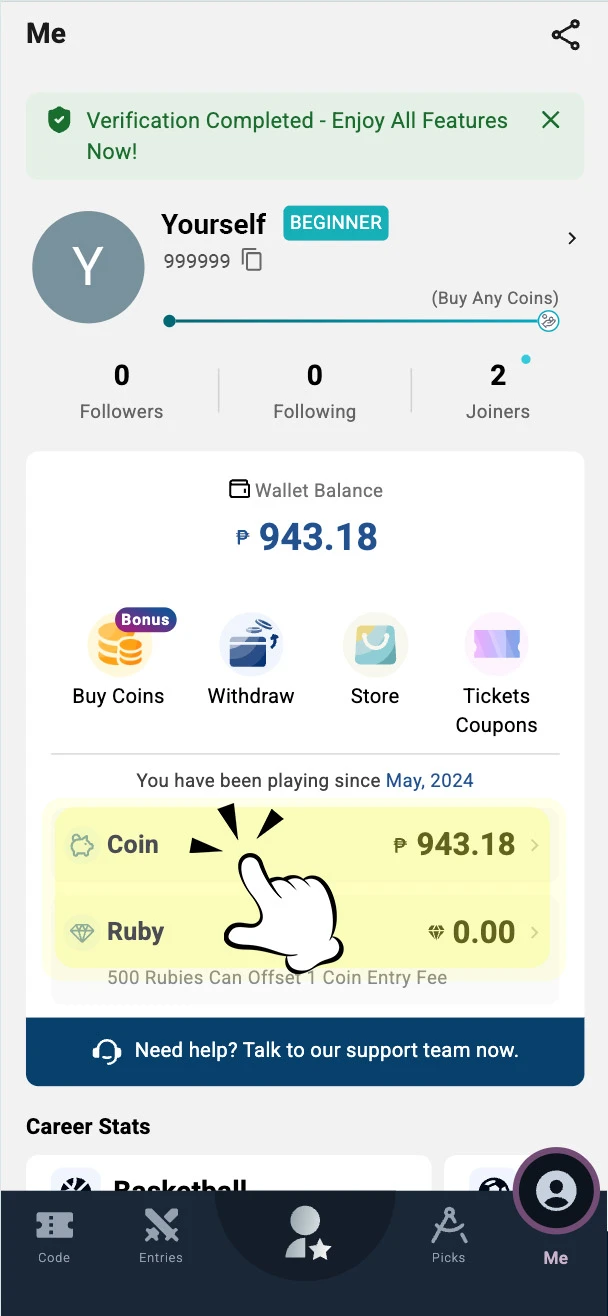
You can use GCash or PayMongo to deposit, subject to the payment methods currently available on the platform.
You can use GCash or PayMongo to withdraw. subject to the withdrawal methods currently available on the platform.
Your withdrawal request will be processed by the system after it is submitted. The actual time required for the funds to arrive depends on the processing time of the bank or digital payment provider. Weekends and regular holidays may cause delays.
Withdrawal time depends on the processing time of the banking service or digital bank. Transactions scheduled on regular holidays are not counted as working days and may be delayed.
If you still need help, click here to contact our customer service.
If your withdrawal was canceled, please check the following first:
• Is your account KYC verified?
• Is your internet connection stable?
• Did you enter the correct bank account information?
• Did you try to withdraw during a regular holiday?
If none of these apply to your case, please click here () to contact our customer service for further help.
According to the Laki Play Terms and Conditions, you must use your own bank or payment account when making deposits and withdrawals. The name on the bank/payment account must exactly match your KYC identity information.
If you intentionally withdraw funds to another person’s account, Laki Play reserves the right to block the account and freeze the withdrawal amount in accordance with PAGCOR and AMLC regulations.
If you accidentally submit a withdrawal to the wrong account, contact customer service and the receiving bank or payment provider immediately. Laki Play may not be able to recover funds after the transaction has been completed.
Contact the receiving bank or third-party provider directly.
If you still need help, click here to contact our customer service.
Yes you can.
Please keep note that according to the Laki Play Terms and Conditions, you must use your own bank or payment account when making deposits and withdrawals.The name on the bank/payment account must exactly match your identity information submitted through the KYC process.
If you have changed your legal name, updated your mobile number, or reapplied for a government-issued ID, please contact the Laki Play Support Team here for assistance.
Once a withdrawal request has been submitted, it cannot be canceled.
The request is sent to the bank or third-party payment provider for processing, and Laki Play may not be able to modify or cancel the transaction after it has been initiated.
Make sure the withdrawal details and amount are correct before submitting your request.
In compliance with PAGCOR regulations, you are strictly prohibited from depositing or withdrawing funds on behalf of others.
All transactions must be made using your own bank or payment account that matches your verified personal identity.
If your friends are interested in joining Laki Play but are unsure how to get started, feel free to guide them to contact our Customer Support Team here for a walkthrough or any further assistance.
For deposit:Deposits below PHP 20 are subject to a 5% transaction fee.
For withdrawals: A PHP 10 transaction fee applies to each withdrawal.
If your deposit or store purchase fails, you can reach out to the Laki Play Support Team here.
Provide the transaction date, approximate time, amount, payment method, transaction reference, and Player ID so our support team can assist you more efficiently in investigating the issue.
Please include the following information to help us resolve the issue faster:
• Deposit or Purchase Date
• Approximate Time of Transaction
• Amount
• Payment Method
• Player ID (Your Player ID is located on the "Me" page, displayed as a string of numbers next to your profile picture.)
Once we receive your information, our team will assist you in resolving the issue as quickly as possible.
Please note: In-game purchases may take 1 to 3 business days or more based on different banking regulations (the business day excludes weekends) to be fully processed and reflected in your account.
Laki Play currently offers basketball and football content. with available sports and leagues based on official real-world data sources.
Available leagues may include the NBA, WNBA, PBA, and selected football leagues from around the world.
We’re continuously expanding and more sports will be added to the platform soon!
Check the Laki Play platform, official website, and social media pages for the latest information.
Laki Play is built around sports knowledge, player performance, and transparent game rules.
• vSkill-Based
Your decisions are based on player performance, statistics, and your understanding of the game—not random outcomes alone.
• Safe & Regulated
Laki Play operates under PAGCOR regulations and follows applicable Philippine gaming requirements.
• Transparent & Fair
Fantasy and Pick’em results are settled using real-world player performance and official or authorized sports data sources, including leagues such as the NBA and PBA.
• Sports-Driven
In Fantasy, your team’s score is based on how your selected players perform in actual games. In Pick’em, results are based on whether a player’s final eligible statistic finishes above or below the displayed Target.
A match refers to an upcoming live sports game in the real world.
Pick'em is a sports game built around the real world of basketball and soccer, the games you already know best.
Just pick your favorite players, predict Higher or Lower on their stats, then sit back and watch the results come in. Perfect for anyone who truly loves the game.
Coin is the main currency used for eligible game entries and other supported activities on Laki Play.
Ruby is a separate platform reward point that may be used for selected marketplace redemptions, other platform benefits, or to offset entry fees in selected Fantasy Coin contests.
Tickets/Coupon may provide selected game-entry discounts, entry-fee offsets, or other promotional benefits. Each Ticket may have its own applicable game, value, expiration date, and usage conditions.
An entry fee is the amount of Coin required to submit an eligible game entry.
Entry fees vary depending on the game, contest, or event. The required amount and applicable details will be displayed before you confirm your entry.
Some selected games or events may offer entries that do not require Coin.
You can check the contest reward or payout structure before submitting your entry, and view the final results afterward.
In Pick’em, results will be displayed on the “Entries” page.
In Fantasy, results will be displayed on the “Joined” page.
You can choose players based on their actual performance and historical stats to view a player’s stats.
In Pick’em mode, you can also pull down on a player’s card to view additional player statistics.
In Fantasy Mode, simply click on their headshot of the player on the Create Team page.
In Pick’em Mode:
If a match is delayed but begins within 12 hours of its originally scheduled start time, the relevant Picks may remain active and will be settled after the match ends.
If the match does not begin within 12 hours of its originally scheduled start time, the affected Picks will be marked as Pushed and the Entry will be recalculated.
If the remaining Entry no longer meets the required conditions, the Entry will be canceled and the full Entry Fee will be refunded.
In Fantasy Mode:
If a match is postponed, the related game entry may be placed on hold while Laki Play follows the updated schedule provided by the official sports league or authorized data source.
The postponed match may remain visible on the platform until a new schedule or final status is confirmed.
In Fantasy Mode:You will receive a refund of the entry fee you paid if the contest you joined is cancelled.
In Pick'em Mode: If a match doesn't start within 12 hours of its scheduled time, the related Pick will be removed. Your entry will then be recalculated based on the remaining active Picks. If the recalculated entry no longer meets the minimum requirements, it will be canceled and the full entry fee will be refunded. Please refer to Laki Play Terms and Conditions for full rules.
Pick’em is a sports prediction game where you select whether a player’s final eligible statistic will be Higher or Lower than the displayed Target.
Each Entry must include two to six Picks, with players from at least two different teams. You may select a maximum of two players from the same team in one Entry.
1. Go to the Pick’em page and select an available sport or match.
2. Choose between two and six player projections.
3. Select Higher or Lower for each player.
4. Choose Flex Play or Power Play, where available.
5. Enter your preferred Entry Fee.
6. Review the Picks, multiplier, and potential result shown on the screen.
7. Tap “Submit Entry” to confirm.
Once submitted, the Entry is locked and cannot be edited or canceled.
In Pick’em mode
Player selection deadlines vary by match. Please submit your entry before selections close.
No. Once a Pick’em Entry has been submitted, it is immediately locked and cannot be edited or canceled.
If your selected player does not participate in the match and is classified as DNP, the affected Pick will be marked as Pushed and removed from your Entry.
Your Entry will then be recalculated based on the remaining active Picks. If the Entry no longer meets the minimum Pick or team-diversity requirements, it will be canceled and the full Entry Fee will be refunded.
Different sports and leagues may use different standards to determine whether a player is considered active.
A Pick is marked as Pushed when it is removed from your Entry and does not count as either a Hit or a Miss.
A Pick may be Pushed when:
• The selected player does not participate in the match
• The player’s final statistic is exactly equal to the displayed Target
• The match does not begin within 12 hours of its originally scheduled start time
Your Entry will then be recalculated using the remaining active Picks.
If one Pick is Pushed, your Entry will be recalculated based on the remaining active Picks and the applicable multiplier for the reduced number of Picks.
Entries reduced to three, four, or five Picks will retain the originally selected Payout Mode.
If a three-Pick Flex Play Entry is reduced to two Picks, it will automatically be settled as a two-Pick Power Play Entry, because Flex Play is not available for two-Pick Entries.
If the player’s final eligible statistic is exactly equal to the displayed Target, the Pick will be marked as Pushed.
It will not be treated as Higher or Lower. Your Entry will be recalculated using the remaining active Picks.
Your Pick’em Entry will be settled after the final match involving all selected players has ended and the relevant official statistics have been verified.
Only statistics recorded during regulation play are counted. Statistics recorded during overtime are excluded.
Once an Entry has been settled, later official stat corrections will normally not change the result. However, Laki Play may correct a settlement in cases involving a clear and obvious statistical error.
Fantasy Sports is a brand-new way to enjoy sports! If you know the players well you can build your own dream team based on real NBA, PBA, and other sports.
When your selected players perform well in real games, you earn Fantasy Points based on their stats. The better your strategy, the higher your ranking — and the bigger your rewards!
In Fantasy, players build a lineup and submit it to an available contest before the entry deadline.
Contest requirements, entry fees, available spots, and reward details are displayed on the relevant contest page.
Usually you can see the following contest types:
1. Normal Contest
The default contest type under every match.
• Coin contest: Join with coin
2. Bonus Contest
A contest with extra coins or rubies in the prize pool.
3. Practice Coin Contest
A contest you can practice and join free
1. You can join a Practice contest to start your journey of Laki Play. Practice contests are completely free and the best way for beginners to get familiar with the game.
2. Once you start to win, you can try to join coin entry contests to win more.
Credits are the lineup budget used to select players when building a Fantasy team.
For basketball contests, you receive a total budget of 100 Credits to select eight players. Each player has a different Credit value based on factors such as previous performance and system projections.
Managing your Credits and selecting players strategically are important parts of building a Fantasy lineup.
These tags indicate the latest available player status:
• O (Out): The player is currently listed as unavailable for the match.
• PRO (Probable): The player is expected to participate but may have an injury or other status concern.
• QUE (Questionable): The player’s participation has not been confirmed.
Player statuses may change before the match. Review the latest official information before submitting or finalizing your lineup.
Laki Play combines real live sports with fantasy gameplay to offer a more thrilling and realistic experience.
In real matches, each team has a coach and a chosen leader. In our game, you become the coach building your dream team and assigning a captain and vice-captain to boost your score.
• Captain earns 2x points
• Vice-Captain earns 1.5x points
⚠️ If they commit fouls, more points will be deducted.
Choosing the right leaders is a key strategy to win in Laki Play.
The data is provided by authorized official sources, such as the NBA and PBA.
Please note that lineups may be adjusted during live games based on the coach’s decisions. We encourage you to follow the live games and adjust your lineup accordingly.
If two or more users finish at the same Fantasy rank, the applicable reward will be divided according to the contest’s tie and reward-distribution rules.
Player statuses are provided through official or authorized data sources, but they may change close to or during a match.
Follow official player and team updates and review the latest available information before finalizing your Fantasy lineup.
You can check the information on the “Joined” or “Result” page.
If you still need help, click here to contact our customer service.
The number of teams you can create depends on the contest’s total spots:
• Lower than 50 spots → up to 1 team
• Between 50 to 200 spots → up to 3 teams
• Between 201 to 1000 spots → up to 5 teams
• Over 1,000 spots → up to 7 teams
• Over 10,000 spots → up to 11 teams
Yes, you can select the same player in multiple Fantasy lineups.
You may also submit the same lineup to a contest more than once, subject to the contest’s entry limit.
For Fantasy contests, yes, you can edit your lineup after joining a contest. You may continue making changes until 10 minutes after the applicable match begins.
In Fantasy mode, you can create a team and join a contest within 10 minutes after the match starts.
For example, if the NBA game of LAL vs. GSW starts at 8:30, you can create and edit your team until 8:40.
Winnings are usually calculated and distributed within 5–30 minutes after the match ends.In most cases, you will receive rewards within 10 minutes.
You can check your reward history by tapping “Me” page.
PA promotional code can be used to redeem selected Laki Play benefits, such as Coin, Ruby, tickets, coupon, or event-specific rewards.
The available benefit and usage conditions depend on the promotion.
Here’s the way to use a promotional code:
1. Go to “Code” page.
2. Enter the promotional code and follow the on-screen instructions.If the reward is a Ticket or Coupon, you can view it in the “Me” page and select “Tickets and Coupons.”
Promotional codes may be obtained through official events, social media campaigns, and new user onboarding rewards. New players can also use a friend’s referral code to redeem rewards on this page.
Complete tasks or join online events to get a coupon or code.
A Coupon or Tickets may reduce the Coin required for an eligible game Entry. Each item has its own applicable game, discount value, expiration date, and usage conditions.
Yes. You can tap the bell icon on the contest card to set up match alerts.
You’ll be notified when the match is about to start.
Here’s the way you can invite your friends:
1. Go to the “Me” page.
2. Select “Invitation Program.”
3. Copy your invitation code or referral link.
4. Share it with your friends.
For further information click our Referral Program .
The Activity Point (AP) Program, also known as AP Level, lets players level up by joining contests or recharging Coins.
Each level unlocks extra in-game rewards, the higher the level, the better the rewards.
If you still need help, click here to contact our customer service.
Your AP Level is based on your total Activity points from current month and last month.
You can gain Activity Points (AP) and upgrade your AP level by:
Using Coins to Join Contests:
Join a contest with 1 coin = Earn 1 AP.
Note: Any canceled contests will not be counted as AP.
Your current AP includes points earned in this month and the entire last month.
Yes. You’ll earn AP Points based on the actual amount you pay, even if you use a coupon.
For example:
• Contest entry = 100 Coins
• You use an 80% off coupon → you pay 20 Coins
• You get 20 points (since 1 Coin = 1 point)